Reporting workspace — Live

Clearer reporting for marketing activity that needs a business decision.

Metricora turns your marketing data into one reporting view your team can defend — agreed definitions, traced sources, reviewed by a person before release.

Accounts are opened by the team after a short scope and data review — usually within a week of the first call.

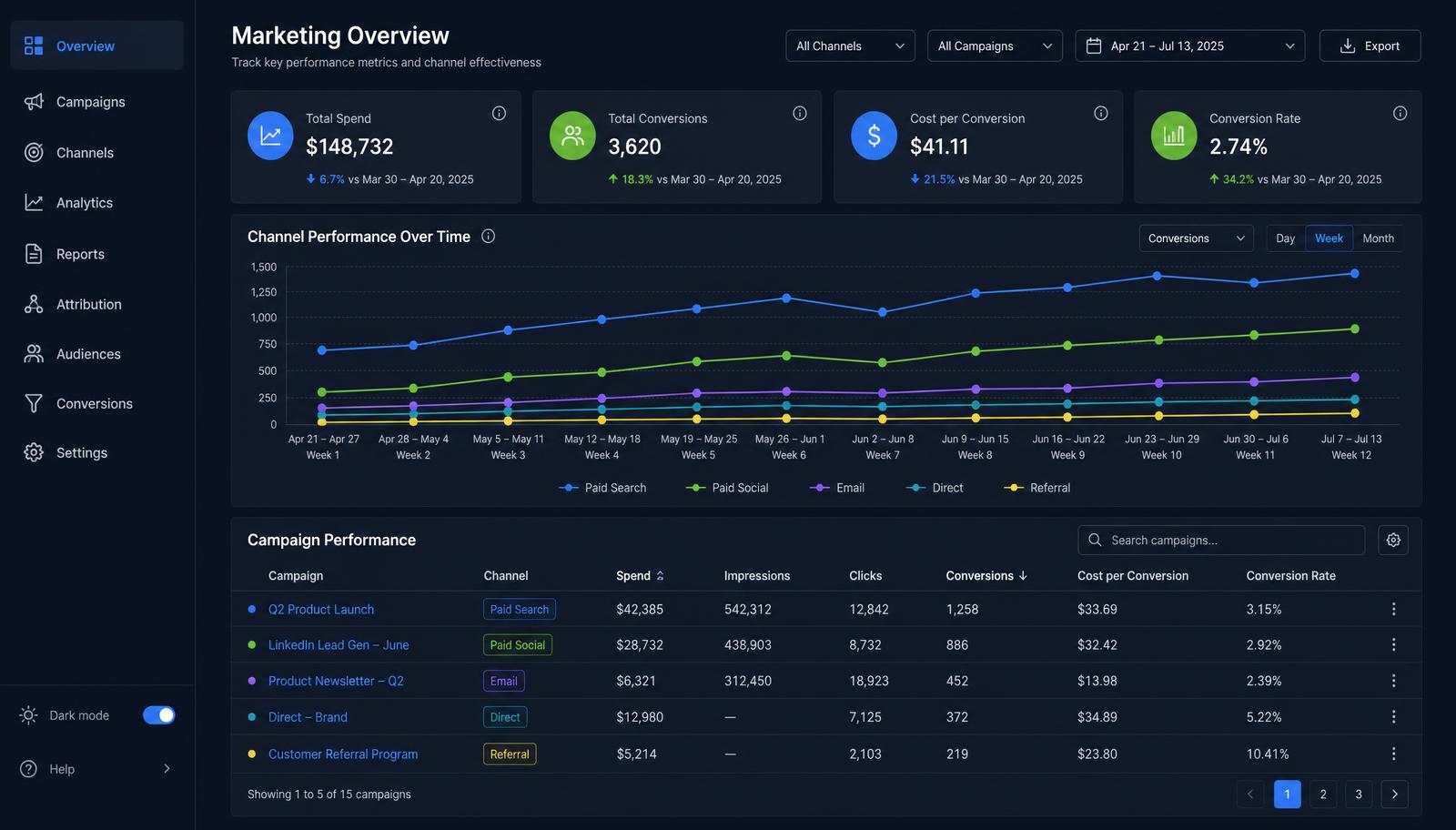
Metricora reporting workspace showing spend, conversions, cost per conversion and conversion rate, a channel performance chart and a campaign table
Reporting workspaceAgreed metrics for one review period, with channel trend and campaign detail in a single view. Example data.
Every figure is traceable
Source, period and definition are recorded next to each number in the reporting pack.
Every capability is documented
Inputs, outputs, access method and limitations are stated for each capability. Nothing is oversold.
People write the analysis
There is no automated, predictive or AI recommendation engine in the product.
Platform status: Live

The reporting workspace, technical reviews and reporting packs are in production use. Onboarding confirms which sources and metric definitions apply to your account.

Track record

Measured by how the work is done, not by logos

Client names, campaign results and testimonials are not published — engagements are confidential. These are the operating facts we can state.

8
Sectors coveredE-commerce, property, healthcare, education, hospitality, professional services, logistics and B2B technology.
250+
Reporting cycles deliveredMonthly and quarterly reporting packs produced since the workspace entered production use.
120+
Metric definitions maintainedWritten definitions held in the definition library, each with its source and calculation recorded.
100%
Every pack reviewed by a personNo reporting pack is released to a customer without a named reviewer signing it off.
Written scope before work starts

Inclusions, exclusions, timeline and cancellation terms are agreed in writing and countersigned before configuration begins.

Source traceability

Every figure in a reporting pack carries its source, collection period and definition, so it can be checked independently.

Documented gaps

Where platforms disagree or data is missing, the difference is recorded in the pack rather than smoothed over.

Your data stays yours

You own the accounts, the source data and the outputs. Access can be withdrawn at any time and your data exported on request.

Available today

What Metricora currently does

Each capability below is in production use, with its inputs, outputs and limitations stated.

Campaign reporting workspace

Live

Brings approved campaign and channel activity into a reporting view that is configured around metric definitions agreed in writing with the customer.

Inputs
Customer-approved data source connections, exported platform reports, or spreadsheet uploads supplied by the customer.
Output
A reporting view and a downloadable reporting pack covering the agreed metrics, period and definitions.
You provide
Provide account access or exports, confirm metric definitions, and nominate an owner for approvals.
Limitations
Reporting reflects only the data the customer supplies. Metricora does not create, edit, publish or control advertising campaigns.
Access
Available to new accounts after a scope and data review.

Website technical review

Live

A reviewed technical assessment of an agreed set of pages, produced as a written report with prioritised findings. Findings are compiled by a person, not published automatically.

Inputs
Website URL, crawl permission, and read access to analytics and search console where available.
Output
A written review document with findings, priority and the checks that were performed.
You provide
Written authorisation to crawl, plus access to the relevant properties.
Limitations
Findings are point-in-time. Implementation is not included unless separately agreed.
Access
Ordered as a bounded package or as part of a retained engagement.

Team access and permissions

Live

Named user accounts, roles and access control within a customer workspace.

Inputs
A confirmed list of authorised users.
Output
Per-user access to agreed reporting views.
Limitations
User changes are actioned by the team on request from the account owner, usually within one business day.
Access
Configured by Metricora on request from the named account owner.

Metricora does not create, edit, publish or control advertising campaigns unless that service is separately confirmed in writing.

Data

What data Metricora can receive

Data intake is deliberately narrow. Anything not listed here is confirmed case by case, in writing.

You own your data

You own the accounts, the source data and the reporting outputs. Access you grant can be withdrawn at any time, and export of your reporting data is available on request.

Recommendations are human

Any recommendation you receive is written and reviewed by a person. There is no automated, predictive or AI recommendation engine in the product.

  • Live

    Customer-supplied exports

    CSV or spreadsheet exports from your advertising, analytics or CRM platforms.

  • Live

    Read-only account access

    Read access you grant to your own advertising or analytics accounts, reviewed case by case during onboarding.

  • Live

    Sources confirmed in writing

    Supported sources for your engagement are confirmed in writing, so both sides know exactly which data is in scope.

Availability

Capability matrix

One table, no ambiguity — inputs, access method and limitations for every capability in the product.

Metricora capability availability, access method and notes
CapabilityWhat it supportsCurrent statusAccess methodNotes
Campaign reporting workspaceA single structured view of agreed marketing metrics for a review cycle.LiveAvailable to new accounts after a scope and data review.Reporting reflects only the data the customer supplies. Metricora does not create, edit, publish or control advertising campaigns.
Website technical reviewA documented review of crawlability, indexing and on-page issues.LiveOrdered as a bounded package or as part of a retained engagement.Findings are point-in-time. Implementation is not included unless separately agreed.
Team access and permissionsMultiple named users with role-based access to a workspace.LiveConfigured by Metricora on request from the named account owner.User changes are actioned by the team on request from the account owner, usually within one business day.
Onboarding

How it works

A short, documented process. Nothing is configured before scope is agreed in writing.

  1. 01

    Initial conversation

    Confirm the business need, the reporting use case and who makes the decision the reporting supports.

  2. 02

    Data and access review

    Confirm which sources, files and permissions are actually supported for your situation.

  3. 03

    Workspace configuration

    Configure the agreed views, metric definitions and user access within the confirmed scope.

  4. 04

    Review and validation

    Check definitions, data quality and expected outputs together before anything is relied upon.

  5. 05

    Ongoing access and support

    Agree the support route, the named account owner and how changes are requested.

Onboarding scope, available features, integrations, timing and support are confirmed in writing before implementation begins.

Review

Reporting is reviewed before it is relied upon

Metricora works from agreed definitions, identified sources and a documented review process. What is available is confirmed before onboarding begins.

Editorial diagram: definitions agreed, sources identified, figures checked, review recorded, reporting released. No photograph of a customer engagement is published, because none has been approved for publication.
Example workflows

Where Metricora is used

These are role-based example workflows, not customer stories. No client names, logos or results are published.

Example workflow
01

Marketing leadership reporting

Who it is for
A marketing lead reporting to a board or owner.
Business question
What did marketing activity produce this period, and against which definitions?
Required inputs
Channel exports or read access, plus an agreed metric list.
Metricora's role
Metricora assembles the agreed metrics into one reviewed reporting view.
Expected output
A monthly reporting pack with sources and periods labelled.
Limitation
Coverage is limited to the sources you supply and approve.
Example workflow
02

Campaign review preparation

Who it is for
An in-house team preparing a campaign review meeting.
Business question
Which activity is worth discussing, and what is the supporting evidence?
Required inputs
Campaign-level exports for the period under review.
Metricora's role
Metricora structures the period into a comparable review view.
Expected output
A review view and a short written summary of what changed.
Limitation
Metricora does not create, edit, publish or control campaigns.
Example workflow
03

Agency and client reporting coordination

Who it is for
An agency reporting to a client, or a client reviewing an agency.
Business question
Are both sides reading the same numbers with the same definitions?
Required inputs
Agreed metric definitions from both parties plus source exports.
Metricora's role
Metricora holds one shared definition set and one reporting view.
Expected output
A shared reporting view both parties can reference.
Limitation
Requires both parties to agree definitions in writing first.
Example workflow
04

Data-quality review

Who it is for
Teams that cannot reconcile figures between platforms.
Business question
Where do the numbers diverge, and why?
Required inputs
The conflicting exports and the period in question.
Metricora's role
Metricora documents the difference and its likely cause.
Expected output
A written data-quality note and a corrected definition where possible.
Limitation
Some platform discrepancies cannot be resolved and are documented as such.
Inside the product

What you actually work in

Two of the screens your team uses each cycle, shown with example data. Live views are configured to your own definitions and sources.

Metricora reporting workspace showing spend, conversions, cost per conversion and conversion rate, a channel performance chart and a campaign table
Reporting workspaceAgreed metrics for one review period, with channel trend and campaign detail in a single view. Example data.
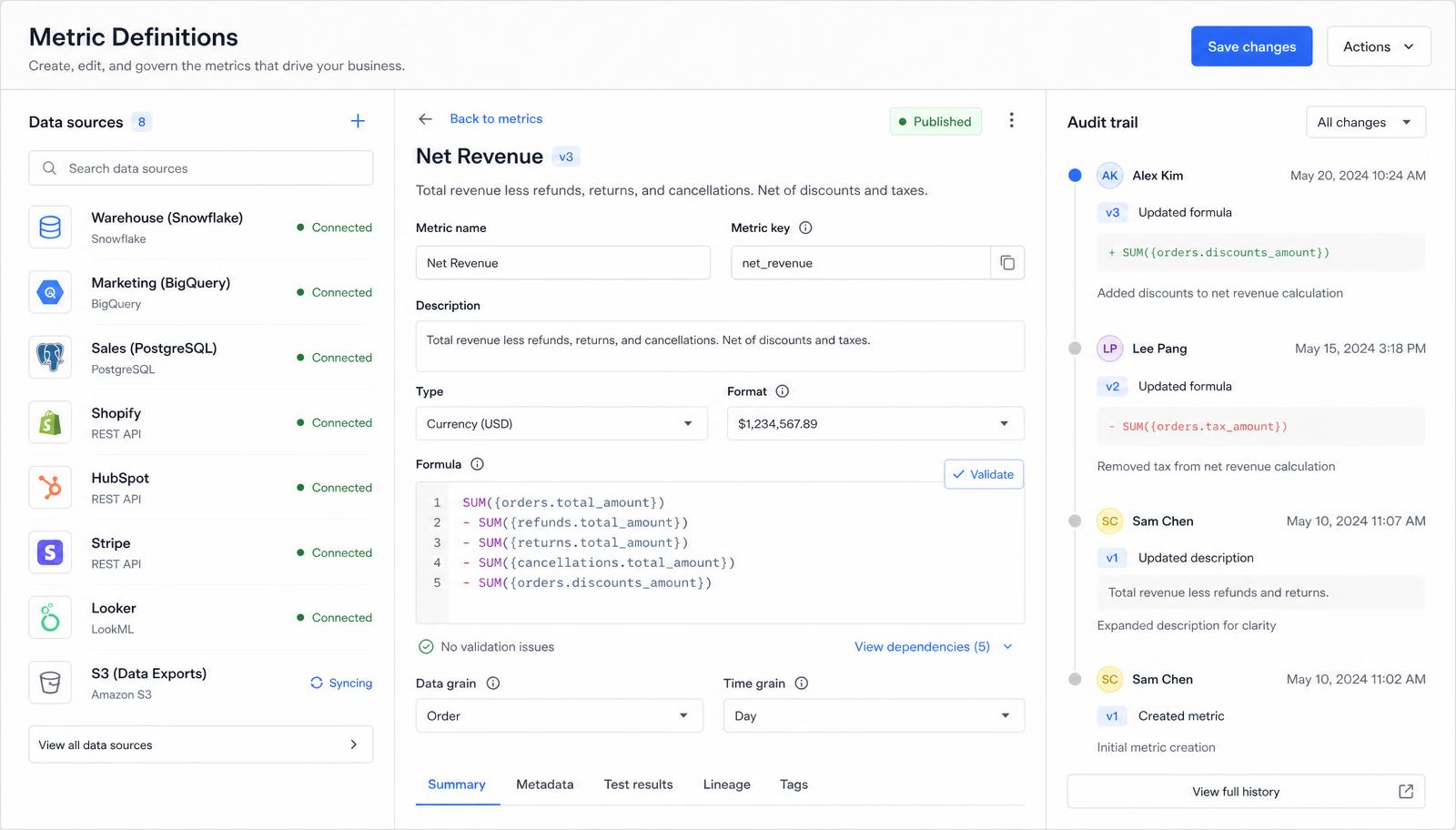
Metricora metric definition editor showing connected data sources, a revenue formula and an audit trail of definition changes
Definitions and sourcesEach metric carries its formula, its sources and a change history, so a figure can be traced and defended. Example data.

A walkthrough on your own data takes about 40 minutes

We use one of your recent reporting periods so you can see the structure against figures you already recognise. Customer reporting packs are confidential and are never shown to another party.

  • Metric definitions used in the reporting view
  • The source of each figure and its collection period
  • Known data gaps and how they are marked
  • What the reporting view does not cover
Reporting workflow
  1. 01
    Data sources

    Exports you supply, or read-only access you grant to your own accounts.

  2. 02
    Review

    Metric definitions, periods and gaps are checked by a person.

  3. 03
    Reporting view

    A configured view covering the agreed metrics for the period.

  4. 04
    Team decision

    The view is used in your review meeting. You keep the record.

How a reporting cycle runs

Product screens and diagrams on this website use example data to show layout and structure. They contain no customer data.

Support

One route, monitored

management@metricora.online

One monitored mailbox handles product support, account questions and formal complaints.

No response-time commitment or support-hours window is published, because none has been formally agreed.

Next step

Tell us the decision your reporting has to support and which data you can share. We will tell you plainly whether it is within current scope.